Documentation

Installing Better Business Reviews WordPress Plugin

# Remove Free version of Plugin.
– Login into WordPress as an admin. Under Plugins, go to ‘Installed Plugins’, find Free plugin ‘Better Business Reviews’ WordPress Plugin.
– deactivate and delete.

# Install and activate “Better Business Reviews PRO”.
– under Plugins, go to ‘add new’
– click button ‘Upload Plugin’
– browse for plugin’s ZIP file you have purchased and click ‘Install Now’
– activate plugin.

# Activate your License Key
– New Item in WordPress menu will appear as ‘BBR PRO’.
– under ‘BBR’, select ‘settings’
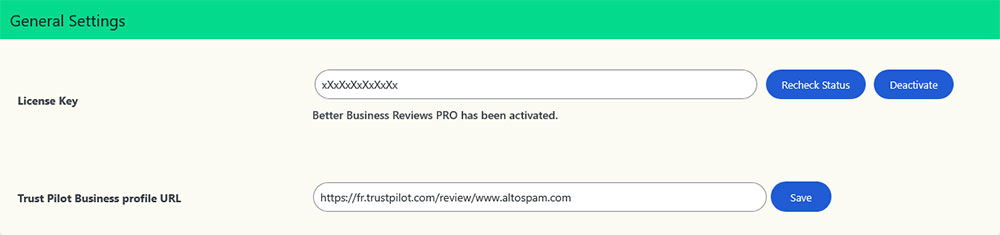
– insert your License key and click ‘Activate’.
Configure Plugin

# Synchronizing TrustPilot Reviews
– Open your Trust Pilot Business page and copy URL. (example – https://www.trustpilot.com/review/itrustcapital.com)
– Go to WordPress Backend and open BBR PRO General Settings.
– Input your URL in ‘Trust Pilot Business profile URL’ and click on ‘Save’ button.

# Use of TrustPilot Plugin Shortcode
– Create a WordPress Page/Post
– add a shortcode block.
– Insert shortcode as given bellow in Shortcode-List section.
– Save and Preview your page/post.

Shortcode

Default[brtpmj_reviews]
Grid Layout[brtpmj_reviews layout=”grid”]
Carousel Layout[brtpmj_reviews layout=”carousel”]
Post Limit[brtpmj_reviews limit=”8″]
Minimum Stars[brtpmj_reviews min_stars=”4″]
Compact Widget[brtpmj_compact_widget]

Customizer Options for Default shortcode

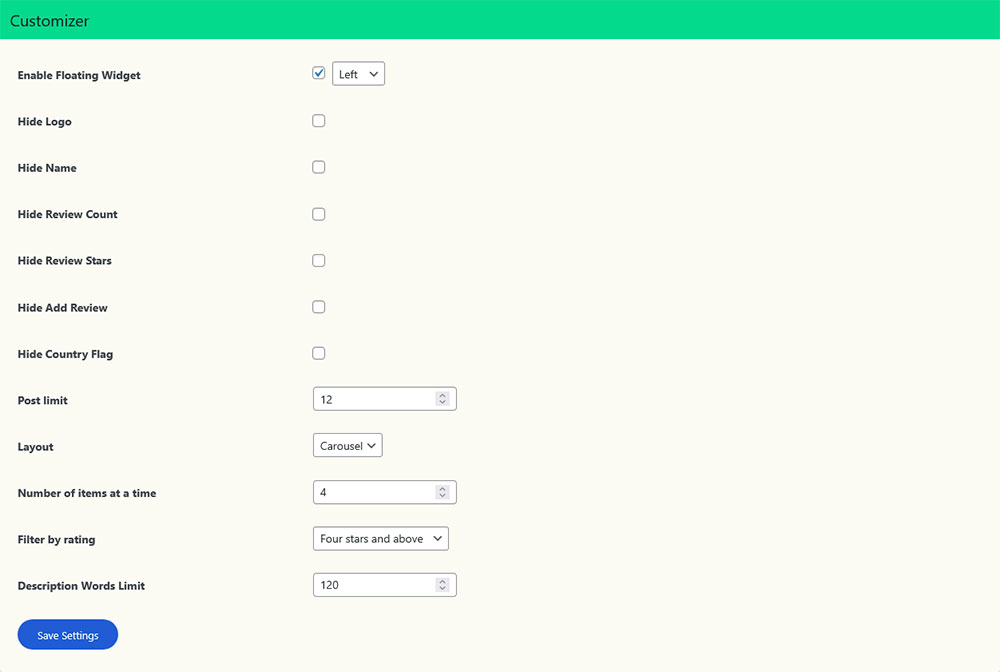
Enable Floating Widget: Enable or Disable the floating widget and set its position to either Left or Right.
Hide Logo: Enable or Disable your business logo.
Hide Name: Enable or Disable your business name.
Hide Review Count: Enable or Disable Total number of business reviews count.
Hide Review Stars: Enable this option to hide the review stars. You can enable this if you have received an email from TP team to remove the stars.
Hide Add Review: Hide ‘Add new review’ link/button.
Hide Country Flag: Hide Country Flag displayed next to Customer’s Name.
Post limit: This will limit number of reviews to display.
Layout: Choose from List / Grid / Carousel layouts.
Number of items at a time: This option appears when Carousel – Layout selected. Set Post count to display at once.
Filter by rating: This will show Reviews from selected start ratings. (All Stars / Five stars / Four stars and above / Three stars and above / Two stars and above / One star and above)
Description Words Limit: This will help adjusting length of description text. Insert value for word count.
Configure Trustpilot WordPress Plugin

Walk-through Video

FAQ

# Do i need Trustpilot API?
– No, this plugin works without forcing you to have API keys.

# Do i need a Premium Account on Trustpilot?
– Plugin works same for free and premium customers of Trustpilot.

# How do i get latest reviews?
– All your business reviews are automatically fetched in Real-Time.

# Compatible with Elementor & other Page-Builders?
– Its very compatible with Elementor builder. While editing a page create a new shortcode block and paste the shortcode. Save the page and preview. Same can be followed for other builders like – Muffin, WPBakery, Visual Composer, Beaver, Divi, SiteOrigin, etc.

# Invoice to my Company name & details after purchasing?
– You can send further details after you place the order. Please write an email to support@trustpilotplugin.com or send the information via our Support-Form. We will then send you the invoice with your company details.

# Deactivating and reactivating license?
– You can deactivate your license and activate on other site or subdomain.
if you forget to deactivate on old site or encounter any problem reactivating, please email us (support@trustpilotplugin.com) with your license key, old domain name and new domain name. Support Team will reset your license key.

Close Reviews

Trustpilot Reviews

Open Reviews

MW
Mark Wooldridge
Review Star

Great work in making the transfer. Thank you Jonathan for your efforts!

Lawrence White
Lawrence White
Review Star

My conversation with iTrust Capital representative Josh was very informative and his Subject Matter Expertise is very helpful for me and the company platform. I was able to accomplish establishing my account through Josh's patience walking me through the necessary steps to complete the process is Exemplary. Josh is very customer oriented and having previously worked in that capacity I appreciate him. iTrust Capital is fortunate to have Josh on the team. I highly recommend iTrust Capital to others regardless of your investment knowledge. Thank you Josh.

M
Meka
Review Star

Francisco Mondragon with iTrustCapital was super friendly and helpful. Excellent customer service! Thank you, Francisco!

Jace Froehlich
Jace Froehlich
Review Star

Romeo was relaxed and very nice to talk and just a great people person as I enjoyed the great customer service he gave at i trust capital.

JL
Jennifer Levine
Review Star

Ayrton was extremely patient and helpful while he was explaining how to send my crypto over to my iTrust account from my cold wallet. He answered all the questions I had for him and put my anxious energy to rest. Thank you Ayrton! I look forward to working with you again in the near future.

D
DKC
Review Star

Thank you Alex for your patience and support in helping me transfer my IRA funds to iTrust Capital.

J
Janisl
Review Star

I've been with iTrust for a few months now and I'm blown away by the level of service they provide every time I call. Rafael helped me with a rollover from my 401k. Even though I've done it a couple of times, it's a confusing process, mainly due to how the 401k processes the money move and the nuances of Roth vs traditional. He was fantastic, made sure everything was in order, and he was patient and fun. At this point I'm a customer for life.

Eddie Henderson III
Eddie Henderson III
Review Star

I love the assistance with funding my Roth IRA account. Thanks (Romeo) Representative.

GT
Glen Takamori
Review Star

Very helpful

RN
Raymond Neal
Review Star

Very polite and answered my question with clarity

K
Kira
Review Star

The support and guidance I received from Francisco was extremely helpful. Moving accounts and money around is always stressful but he walked me through the process and was very helpful answering all my questions along the way.

m
me
Review Star

I love iTrust Capital customer support. They are the benchmark for all other companies to immulate! Romeo was super helpful. It's so refreshing to work with a LIVE customer service representative and someone who is courteous, knowledgeable, efficient, and speaks CLEAR English.

LaShawn Tucker-Ross
LaShawn Tucker-Ross
Review Star

Romeo provided excellent service and patience explaining the Roth IRA transfer process. I feel very comfortable securing my assets with iTrust Capital.

John Loranger
John Loranger
Review Star

Jonathan made things easy for me !!

MW
Mark Williams
Review Star

It was easy do to the good help from Johnathan you should give him a promotion .

JS
Jeff Salamon
Review Star

I struggle as an older dude with tech - Jonathan and Trent were wonderful, very helpful and professional

Rich Amatulli
Rich Amatulli
Review Star

Had an excellent conversation with Walter today. Was able to finalize funding my account. Now to get to some investing!! Thanks!!

Daoud Saleem
Daoud Saleem
Review Star

Mr. Chris Lee answered all of my pressing questions that I had in regards to transferring my Roth IRA into a I Trust Capital IRA. Chris also advised me of the process of getting my Crypto off an exchange and into a Premium Custody account. Thanks very much Chris for providing me with an exceptional customer experience.

J B
J B
Review Star

I was extremely impressed with the knowledge and true professional that was delivered to me by Chris Lee. He helped me understand and appreciate the platform that you all have. I now have a better understanding and much clarity with my direction moving forward to secure my financial future with my family. Thank you so much !!!

DW
Dan Warrington
Review Star

Thank you Rafael, for the time you put in to help this process along to get a better understanding of this company and what is offered on there platform. Dan